WFO Live Break Settings
Break Settings are controlled with the Break Settings table.
Break Settings Table
The Break Setting table allows the user to define the earliest and the latest break times allowed based on the shift’s session lengths. How sessions work depend on whether a shift has a lunch or not. This document shows examples of both types of shifts: with-lunch and without-lunch. The advantage of having these break adjustments based on sessions, is that you don’t have to define break behavior for every shift you create, but rather just for a small number of session lengths.
There are always two sessions in a shift with a lunch (see Figure 1), one before and one after. Session 1 is measured from the shift start time (12:00) to the start of the lunch (14:15). Session 2 is the end time of the lunch (14:45) until the end of the shift (17:00).
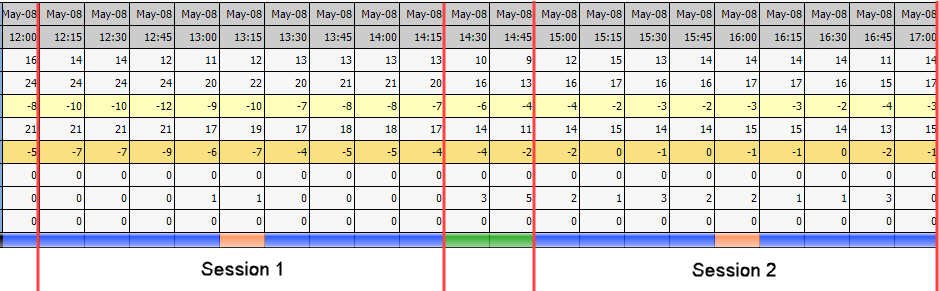
Figure 1
Example:
Assume you have an agent that is working 9:00 to 18:00 with a lunch at 14:00. That means that the agent has a 5-hour session because the amount of time from 9:00 to 14:00 is 5 hours. If you look at figure 2 you can see that for a 5-hour session length, the allowable break start times are between 1.25 and 3.75 hours from the start of the session. Since the session starts at 9:00, that means the earliest break can occur at 10:15 since it is 1.25 hours after 9:00. The latest it can occur is 3.75 hours after the start of the session (9:00) at 12:45.
Now assume that you want to make sure that no agent has to wait 3.75 hours for a break, you could adjust the 3.75 hours limitation to something lower, like 2 hours. This would make the latest break start 11:00 rather than 12:45. This adjustment would apply to all breaks that have a 5-hour session.
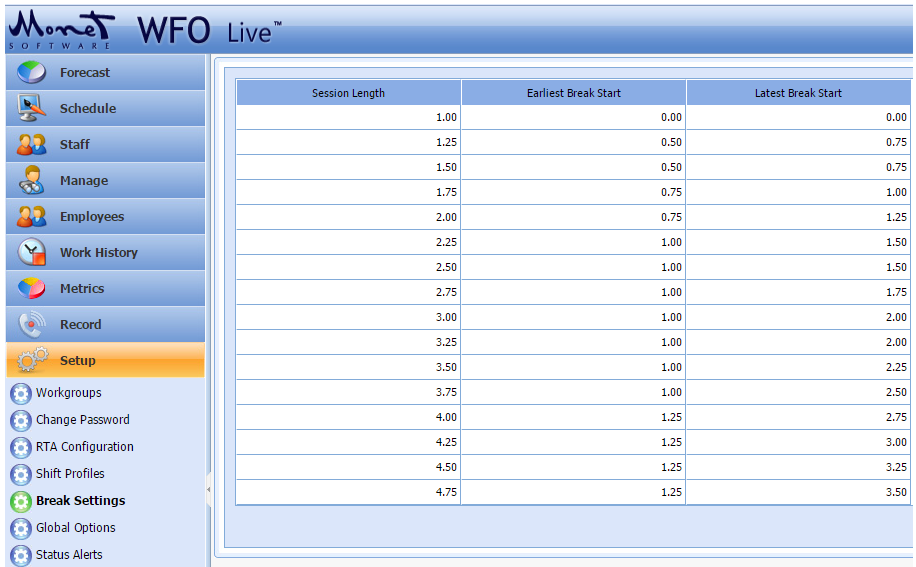
Figure 2
Break Placement for Shift Without Lunches
If you have a shift with no lunch but requires two breaks, there is a simple rule to determine how sessions are created. The first session is the first 75% of the shift. In figure 3 that means the session is from 9:00 to 13:30. The 4.5 hour session that is created in the first 75% creates the rules for placing the first break.
The second session is measured from the end of the first break until the end of the shift. In this case that is 11:15 until 13:45. The session is 3.75 hours long and dictates the break placement rules for the second break. If the shift only has one break, then the entire shift is the session.
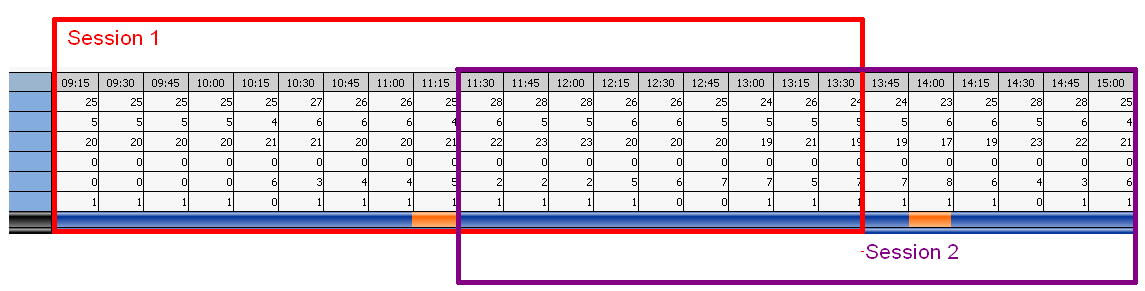
Figure 3